
更多Sphinx定制
除了核心Sphinx所能提供的功能之外,有两种主要方式可以定制你的文档:扩展和主题。
启用内置扩展
除了这些配置值之外,你还可以通过使用扩展进一步定制Sphinx。Sphinx自带了一些内置扩展,还有许多由社区维护的扩展。
例如,要启用sphinx.ext.duration扩展,请在你的conf.py中找到extensions列表并添加一个元素,如下所示:
docs/source/conf.py
# Add any Sphinx extension module names here, as strings. They can be
# extensions coming with Sphinx (named 'sphinx.ext.*') or your custom
# ones.
extensions = [
    'sphinx.ext.duration',
]
之后,每次生成文档时,你都会在控制台输出的末尾看到一份简短的持续时间报告,就像这样:
(.venv) $ make html
...
The HTML pages are in build/html.

====================== slowest reading durations =======================
0.042 temp/source/index
使用第三方HTML主题
另一方面,主题是定制文档外观的一种方式。Sphinx有几种内置主题,也有第三方主题。
例如,要在你的HTML文档中使用Furo第三方主题,首先你需要使用pip在你的Python虚拟环境中安装它,如下所示:
(.venv) $ pip install furo
然后,在你的conf.py中找到html_theme变量并替换其值,如下所示:
docs/source/conf.py
# The theme to use for HTML and HTML Help pages.  See the documentation for
# a list of builtin themes.
#
html_theme = 'furo'
通过此更改,你将注意到你的HTML文档现在具有了新的外观:
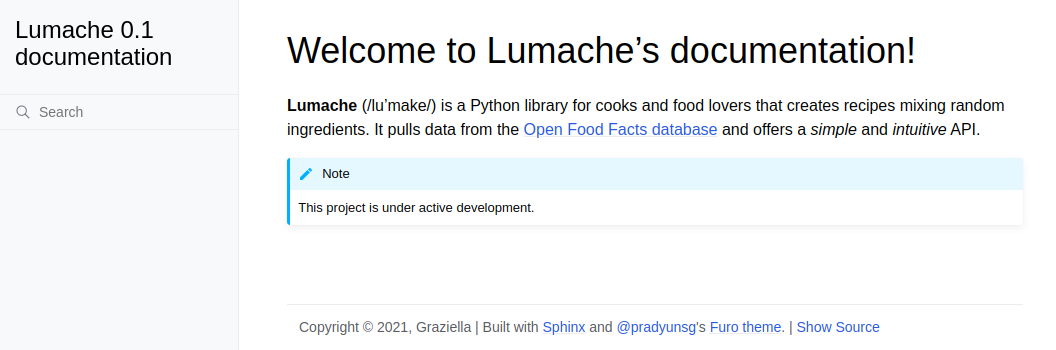
Lumache的HTML文档(使用Furo主题)
现在是时候扩展叙述性文档并将其拆分为多个文档了。